
Custom Github Pages 404 Page with React Router
12 minute read • November 3, 2025
Github Pages is one of the most straightforward ways of hosting a static website for free. With upload-pages-artifact and deploy-pages, developers can commit and merge their changes and have them deployed in minutes or even seconds. This makes Github Pages an obvious choice for deploying and hosting Single-Page Applications (SPAs) built with React.
The Problem: Routing
The most commonly faced issue when deploying React applications to Github Pages stems from routing. Many users find that while React Router’s client-side routing works well locally, it is not necessarily supported by Github Pages. Most client-side routing libraries require that all page requests are sent to index.html, which is not supported by Github Pages. Instead, requesting any route other than the index will result in a 404.
Legacy Workarounds
Prior to React Router v6.4, the most common workaround was to use a HashRouter, which was heavily discouraged in the v6 documentation:
Warning
“We strongly recommend you do not use HashRouter unless you absolutely have to.”
React Router v6.4 introduced the Data APIs, which included route.loader, route.action, route-based lazy-loading, and more than a dozen hooks. To leverage these, users had to migrate to a “data router” such as createBrowserRouter or createMemoryRouter. The docs recommend that all projects use createBrowserRouter, but many static hosting platforms (including Github Pages) will force developers to use createHashRouter instead.
Both HashRouter and createHashRouter are suboptimal for several reasons. Using the hash portion of the URL for routing can have a negative impact on SEO. Using the URL hash in this manner can conflict with its intended uses, such as for navigating to specific parts of a given page via the anchor hash. In my subjective opinion, seeing hash-routing in the wild is often a dead giveaway that an app is using outdated APIs and techniques.
React Router v7
React Router v7 (A.K.A Remix v3) offers three strategies or “modes” for routing. The modes are called “Declarative”, “Data”, and “Framework”, with each successively adding more features. “Declarative” mode will be the most easily recognizable to users of prior versions of React Router, offering the fewest features but the easiest configuration. “Data” mode mirrors the additions made in v6.4, offering loaders, actions, etc. “Framework” mode, while the most opinionated, offers the most features, many of which are entirely new to React Router. Within “Framework” mode, users have three rendering strategies to choose from: client-side rendering, server-side rendering, and static pre-rendering.
Of these three rendering strategies, we can immediately rule out server-side rendering, since Github Pages does not support SSR. Client-side rendering is of course supported, but will lead to the same routing pitfalls as described above. Static Pre-rendering is the answer to all (or at least most) of our problems.
Static Pre-Rendering with v7’s Framework Mode
Static pre-rendering allows us to build individual routes / pages at build time, meaning that the development process feels like that of a React SPA, but the end result includes multiple discrete html files which are easily consumable by static hosts like Github Pages. Static pre-rendering “solves” many of the problems commonly associated with SPAs. The React Router docs describe it as:
“… a build-time operation that generates static HTML and client navigation data payloads for a list of URLs. This is useful for SEO and performance, especially for deployments without server rendering. When pre-rendering, route module loaders are used to fetch data at build time.”
While the docs describe static pre-rendering as a third rendering strategy, it can be used in combination with client-rendered SPAs or SSR. It is also worth noting that pre-rendered routes can leverage some of React Router’s SSR APIs that would not otherwise be available to non-SSR’d apps.
Tip
While an over-simplification, it can be helpful to think of static pre-rendering as build-time SSR.
Getting Started
This article assumes you have a working React application using React Router v7 in “Framework” mode. If you are starting a new project, consider following the Address Book example in the docs. For the purposes of this article, our starting point should be an app with SSR disabled. The react-router-config.ts should look something like this:
import type { Config } from '@react-router/dev/config';

export default {
  ssr: false,
  buildDirectory: 'dist',
} satisfies Config;
We can then tell React Router to pre-render our pages by supplying a prerender value. Setting prerender to true pre-renders all routes found in your routes.ts file. For more granularity, set the value to a list of route path strings. For even more flexibility, provider a function that returns a list of route path strings. This can be useful if you need to list the files in a directory, asynchronously fetch items from a CMS or DB, or perform other complex build-time logic.
import type { Config } from '@react-router/dev/config';
import { getArticlePaths } from './articles/utils';

const paths = {
  home: '/',
  articles: '/articles',
  article: '/articles/:slug',
};

export default {
  ssr: false,
  buildDirectory: 'dist',
  // prerender: true,
  // prerender: ['/', '/articles'],
  async prerender() {
    // exclude dynamic routes like /articles/:slug
    const nonSlugPaths = Object.values(paths).filter(
      (p) => !p.includes(':') && !p.includes('*')
    );
    // asynchronously get dynamic article paths
    const articlePaths = await getArticlePaths();
    // deduplicate paths
    const deduped = new Set([...nonSlugPaths, ...articlePaths]);
    return Array.from(deduped);
  },
} satisfies Config;
Warning
Even though Framework mode leverages Vite, it seems that certain Vite APIs and plugins do not behave as expected when used within prerender or executed directly in this file. For example, users have reported not being able to import .md files with import.meta.glob in this issue. I have personally observed that vite-plugin-markdown does not work within this file, and have had to fall back to the Node’s fs and path modules.
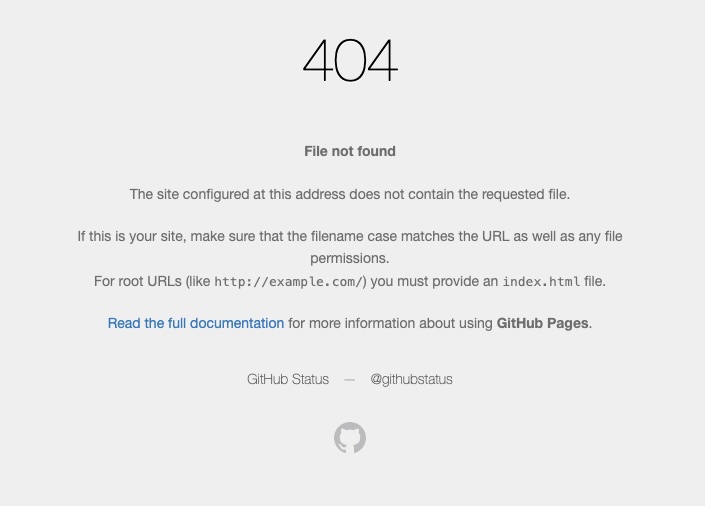
Once deployed, we’ll see something like this when we navigate to any routes that were not pre-rendered:
Solution: Error Boundaries & the SPA Fallback
Every React application should have a top-level error boundary, and this one is no different. Let’s create a reusable component called ErrorView and return it from the ErrorBoundary exported in our root.tsx.
// src/components/ErrorView.tsx
import { Separator } from '@base-ui/react';
import styled from '@emotion/styled';

const StyledSeparator = styled(Separator)`
  width: 1px;
  height: 2rem;
  background-color: var(--color-divider);
`;

export default function ErrorView({
  message,
  details,
}: {
  message: string;
  details: string;
}) {
  return (
    <>
      <span
        style={{
          flexGrow: 1,
          height: '100%',
          display: 'flex',
          justifyContent: 'center',
          gap: '1rem',
        }}
      >
        <span style={{ display: 'flex', alignItems: 'center', gap: '1rem' }}>
          <h2 style={{ fontSize: '1.5rem', fontWeight: 300 }}>{message}</h2>
          <StyledSeparator orientation="vertical" />
          <p style={{ fontSize: '1.5rem', fontWeight: 300 }}>{details}</p>
        </span>
      </span>
    </>
  );
}
// src/root.tsx

// Layout, HydrateFallback, etc.

export function ErrorBoundary() {
  const message = '404';
  const details = 'Not Found';

  return <ErrorView message={message} details={details} />;
}

// ... default export; likely returns an <Outlet />
Let’s build our application and look at the dist. Notice anything?
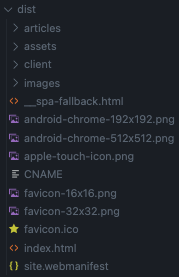
The __spa_fallback.html file looks interesting. The React Router pre-rendering docs have a section titled Pre-rendering with a SPA Fallback that describes this file:
If you want ssr:false but don’t want to pre-render all of your routes - that’s fine too! You may have some paths where you need the performance/SEO benefits of pre-rendering, but other pages where a SPA would be fine.
You can do this using the combination of config options as well - just limit your prerender config to the paths that you want to pre-render and React Router will also output a “SPA Fallback” HTML file that can be served to hydrate any other paths (using the same approach as SPA Mode).
This will be written to one of the following paths:
- build/client/index.html - If the / path is not pre-rendered
- build/client/__spa-fallback.html - If the / path is pre-rendered
The docs then go on to describe how this file is intended to be used:
You can configure your deployment server to serve this file for any path that otherwise would 404. Some hosts do this by default, but others don’t.
Unfortunately, Github Pages does not let us configure this sort of behavior. Github Pages will only serve your 404 page if it is titled 404.html and sits at the top level of your dist. Luckily, we can easily rename this file so that Github Pages knows to serve it. For me, this was as simple as adding a job to copy over the file in my deploy action:
# .github/workflows/deploy.yml
name: Deploy static content to Pages

on:
  # Runs on pushes targeting the default branch
  push:
    branches:
      - main

  # Allows you to run this workflow manually from the Actions tab
  workflow_dispatch:

# Sets the GITHUB_TOKEN permissions to allow deployment to GitHub Pages
permissions:
  contents: read
  pages: write
  id-token: write

# Allow one concurrent deployment
concurrency:
  group: 'pages'
  cancel-in-progress: true

env:
  CI: true

jobs:
  deploy:
    environment:
      name: github-pages
      url: ${{ steps.deployment.outputs.page_url }}
    runs-on: ubuntu-latest
    steps:
      - name: Checkout
        uses: actions/checkout@v4
      - name: Set up Node & pnpm
        uses: pnpm/action-setup@v4
        with:
          version: 10.4.1
          run_install: |
            - recursive: true
              args: [--frozen-lockfile]
      - name: Build
        run: pnpm run build
      - name: Copy 404 Page # add this!
        run: cp ./dist/__spa-fallback.html ./dist/404.html # and this!
      - name: Setup Pages
        uses: actions/configure-pages@v5
      - name: Upload artifact
        uses: actions/upload-pages-artifact@v3
        with:
          # Upload dist repository
          path: './dist'
      - name: Deploy to GitHub Pages
        id: deployment
        uses: actions/deploy-pages@v4
Now any 404ing routes will serve our SPA fallback, which renders our ErrorView component!

Great! For most of us, this is sufficient! We are able to gracefully handle 404s in our React apps without falling back to Github Pages’ default 404 page or using legacy routing strategies. But can we do better?
There are two issues with this approach:
- There is no differentiation between genuine 404 errors and other types of errors. All errors will be treated as 404s, regardless of where or how they originated, which can be misleading to users and developers alike.
- Many users may expect the URL to have updated to /404 instead of remaining on whichever invalid route they initially tried to access. This may or may not be suitable for your use case and preferences, but I prefer to redirect to a dedicated 404 route.
Taking It Further: Redirecting to a Dedicated 404 Route
Let’s start by creating a dedicated 404 page based on our existing ErrorPage component.
// src/routes/404.tsx
export default function NotFoundRoute() {
  return <ErrorPage message="404" details="Not Found" />;
}
Next, we’ll update update our routes.ts and the router config’s prerender option to point to this new route
// src/routes.ts
import { type RouteConfig, index, route } from '@react-router/dev/routes';

export default [
  index('routes/Home.tsx'),
  route('/articles', './routes/Articles.tsx'),
  route('/articles/:slug', './routes/articles.$slug.tsx'),
  route('/404', './routes/404.tsx'), // add this!
] satisfies RouteConfig;
import type { Config } from '@react-router/dev/config';
import { getArticlePaths } from './articles/utils';

const paths = {
  home: '/',
  articles: '/articles',
  article: '/articles/:slug',
  error404: '/404', // add this!
};

export default {
  ssr: false,
  buildDirectory: 'dist',
  async prerender() {
    // exclude dynamic routes like /articles/:slug
    const nonSlugPaths = Object.values(paths).filter(
      (p) => !p.includes(':') && !p.includes('*')
    );
    // asynchronously get dynamic article paths
    const articlePaths = await getArticlePaths();
    // deduplicate paths
    const deduped = new Set([...nonSlugPaths, ...articlePaths]);
    return Array.from(deduped);
  },
} satisfies Config;
Differentiating 404s from Other Errors
Our last task is to differentiate between 404 errors and other types of errors within our ErrorBoundary. First, we can check against React Router’s isRouteErrorResponse, which tells us if an error is a 4xx/5xx error thrown from an action or loader. If this check returns true, we can also check the error’s status to see if it matches 404. These two checks are useful, but they will only tell you if a loader or action threw a 404. In the case of a route not existing, a SingleFetchNoError is thrown. Frustratingly, there is not a single mention of this error in the documentation. By inspecting the source code for React Router v7, we can see that SingleFetchNoResultError directly extends Error without adding any additional properties.
# react-router/packages/react-router/lib/dom/ssr/single-fetch.tsx
...
class SingleFetchNoResultError extends Error {}
...
Even more frustratingly, React Router does not export this error, so we cannot do an instanceof check against our errors. Note that I plan on submitting a PR to React Router to address this. As an admittedly brittle workaround, we can reference the error message directly. As of writing this article, SingleFetchNoError are only thrown in one place, with a message of No result found for routeId "${routeId}".
// react-router/packages/react-router/lib/dom/ssr/single-fetch.tsx
...
function unwrapSingleFetchResult(
  result: DecodedSingleFetchResults,
  routeId: string,
) {
  ...
  let routeResult = result.routes[routeId];
  if (routeResult == null) {
    throw new SingleFetchNoResultError(
      `No result found for routeId "${routeId}"`,
    );
  }
  ...
}
...
Based on this knowledge, we can implement a utility function to check if an error is a SingleFetchNoResultError.
const isSingleFetchNoResultError = (error: unknown): boolean => {
  return (
    error instanceof Error &&
    error.message.startsWith('No result found for routeId')
  );
};
We now have everything we need to update our ErrorBoundary to differentiate between 404s and other errors, and redirect to our dedicated 404 route when appropriate.
// src/root.tsx
export function ErrorBoundary({ error }: Route.ErrorBoundaryProps) {
  const message = 'Error';
  let details = 'An unexpected error occurred.';
  let stack: string | undefined;

  if (
    (isRouteErrorResponse(error) && error.status === 404) ||
    isSingleFetchNoResultError(error)
  ) {
    return <Navigate to="/404" replace />;
  } else if (import.meta.env.DEV && error && error instanceof Error) {
    details = error.message;
    stack = error.stack;
  }

  return <ErrorPage message={message} details={details} stack={stack} />;
}
Conclusion
Once deployed, we can verify that navigating to invalid routes correctly redirects to our dedicated 404 page! Additionally, we preserved context about other types of errors, which will be useful for debugging in development. You could take this approach even further by creating dedicated pages for other types of errors.This 404 redirection strategy also works for slug routes that do not exist, such as /articles/non-existent-article_. This website was built with this exact approach, so feel free to reference the source code. Thanks for reading!
Tip
When working with slug routes, we often need to check if the requested resource exists (i.e., if a file exists in the file system or if a record exists in the database). It is best practice to perform this check in the route’s loader and throw a 404 error if the resource is not found. This will look something like return redirect('/404', 404);. Normally, loaders are only available with SSR, but React Router’s static pre-rendering allows us to use loaders without enabling SSR. We can also use a clientLoader when necessary, although this will only run on the client side after the initial page load.
Note
Why not just bypass the SPA fallback and the ErrorBoundary and directly copy over our 404 page from ./dist/404/index.html to ./dist/404.html? It seems that when these are bypassed, the 404 error is treated as a generic error and we lose the ability to handle it or style the generic error view that React Router renders.